
Are you facing problem of installing the Android Market Place Versions which
are still unresolved by Google.Then don`t worry as here I bring the new update
for The Android Market Place 3.3.11. The update is featured with the WiFi updates so there will be an option for all the low bandwidth users to switch to
WIFI to get better net connect.
After Posting The How To Update Samsung Galaxy 551 I5510 to JPKD3 2.. i wrote this new tutorial for the android users
HOW TO GET THE ANDROID MARKET PLACE 3.3.11 :

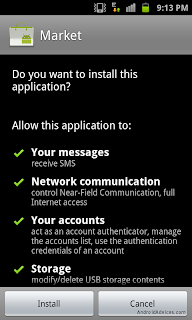
The New Market Place For Android is made such that the most of the users are
benefitted from it.The developers tried to make it best ,user friendly and most
downloadable.
I recommend you to choose this as it`s new and exciting and almost working easily without much help/
The new WiFi is also really feb.


After Posting The How To Update Samsung Galaxy 551 I5510 to JPKD3 2.. i wrote this new tutorial for the android users
HOW TO GET THE ANDROID MARKET PLACE 3.3.11 :
- First download the Android Market Place APK file.
- After that connect the phone to your PC/ Laptop Using The USB(Universal Serial Bus) Cable and then copy the already downloaded .APK file and then take out the cable from the system
- Now open the the .APK file of The Andoird Market Place which you just copied to your android and install it in your phone
- After this, the application has already been installed in your phone latest 3.3.11 version
Get the Help From Here:


I recommend you to choose this as it`s new and exciting and almost working easily without much help/
The new WiFi is also really feb.

After writing various article for Android Gyan.I am writing this first post for my blog on Updation Of Samsung Galaxy.This post is generally for Samsung Galaxy I5510 Smart phones.I was recently surfing the android devices for the latest content and came to know that know you can update your JPKD3 Froyo 2.2 Firmware Arab Version.So only Arab Users can Use it.I know its little void not to have this feature launched in English language.
The developers are saying that when the New Ginger bread version update will be available they will surely update Arabs about the updation process.
For applying the new firmware ,they are using the odin Flash leaving the KIES, I suggest you to start using this new firmware for future purpose.Be ready to use the odin Flash .
The updatings they are providing will unroot your already rooted phone.So you have to do that setup of rooting again.
Procedure:
- First Step Is to Download Samsung Galaxy (l5510 Package) And save it on your PC/Laptop Hard drive..
- Extract them .fill the password “androiddevices.com” while extracting.

- Check if all the files are downloaded by taking this screen shot help.

- In the extracted files try to search for the Odin Tool,And run this software.After this Switch your phone Off and be sure about the Odin to be in activation stage.

- Now make your phone switched On and put it into downloading Mode by pressing the volume down key and OK key along with power button.(this will put your phone in downloading mode)
- Once the phone is put in downloading mode,takeout the USB data cable and connect the phone with PC/Laptop.When the phone is connected,The COM Port will turn yellowish color which indicate that all drivers are successfully installed on your phone
In the odin Tool,Click The OPS option and One package option and after that choose the file as shown in the screen shot below.
OPS -- CALLISTO_v1.0.ops
One package -- I5510JPKD3.tar

- Once all these files are selected .Click the `Start` option and start the process of Updation,This will take few minutes but do not disturb the phone in between.After finishing the Updation,you phone will automatically restart or do it manually.Again turn Off your Mobile and Switch On to enter in the recovery Mode by by pressing the volume Up key and OK key along with power button.
- In the recovery Mode,choose the option Wipe Data or Factory Reset And Wipe Cache Partition.During the updation process of updating the firmware the cache files generate and damage some of the application on the phone ,as to avoid such damage we need to clean up all the cache files.
- Once all the cache data is deleted Reboot Your Phone.After that Choose the language option and Google Account Preferences to put your phone in normal postion as earlier.
Note:I tried my best to share with you this article and steps with screen shots.But if you have any doudt or not satisfied then do not experiment this on your phone.
Phew! I know this is little Hactic But its an updation of Android so it requires some energy.Show case your Phone now.
Reference: Android Devices Article On Galaxy Smart Phone Update
Android Gyan
Reference: Android Devices Article On Galaxy Smart Phone Update
Android Gyan


